Home › Blog › How to Catalog 500 Books
How to Catalog 500 Books
By The PageSwipe Team · Published 1 May 2026
The short answer: to catalog 500 books, work one shelf at a time and scan each book's ISBN barcode in a continuous flow so the title, author and cover fill in automatically. Done by hand, 500 books is an illustrative 12 to 16 hours of typing. Done by scanning, the same collection takes well under an hour. Set aside barcode-free books and box sets for a short batch at the end, review duplicates last, and you can catalogue a large collection in a single sitting.
TL;DR
- Typing 500 books by hand takes most of a weekend — roughly 12–16 hours at an illustrative 1.5–2 minutes per book.
- Scanning ISBN barcodes takes under an hour. An illustrative 127 books in about 8 minutes scales to 500 in well under 60 minutes.
- Go shelf by shelf so you always know where you are and never lose your place.
- Batch the awkward cases — no-barcode books, box sets and duplicates — at the end, so they never break your rhythm.
- Cataloguing in PageSwipe is free and unlimited — no 50-book cap, no ceiling at 500.
A shelf of 30 books is a pleasant afternoon. Five hundred books is a different animal. It is the collection built over years — the fiction wall, the cookbooks in the kitchen, the kids' picture books, the box of paperbacks you keep meaning to sort. The reason it never gets catalogued is simple: the manual way is genuinely brutal, and everyone who has tried it once knows it. This guide is about doing it in a way that finishes.
Why cataloguing a large collection by hand is so painful
Let's be honest about the manual method, because that honesty is the whole argument. To type a single book into a spreadsheet or a form, you look at the spine, find the title, find the author, often flip to the copyright page for the edition or ISBN, switch to the keyboard, type it all, correct a typo, and move on. Call it 1.5 to 2 minutes per book when you include the looking-up and the inevitable interruptions. (That per-book figure is illustrative — your real pace depends on your typing speed and how much detail you capture.)
Run the illustrative math for 500 books:
- At 90 seconds each: 500 × 90 = 45,000 seconds ≈ 12.5 hours.
- At 2 minutes each: 500 × 120 = 60,000 seconds ≈ 16.7 hours.
That is two full working days, or a genuinely lost weekend. And the pain is not only the hours — it is the friction. Hand-typing invites typos in author names, inconsistent title formatting, and forgotten entries. Halfway through, momentum dies. The half-finished spreadsheet becomes another thing on the to-do list. Most large collections never get catalogued not because people don't want to, but because the manual route quietly defeats them around book number 80.
The fast route: scan instead of type
Nearly every book printed since the early 1970s carries an ISBN barcode, usually on the back cover near the price. A scanner reads that barcode and looks up the full record — title, author, cover image, edition — in a fraction of a second. You are no longer typing; you are just moving the phone from one spine to the next.
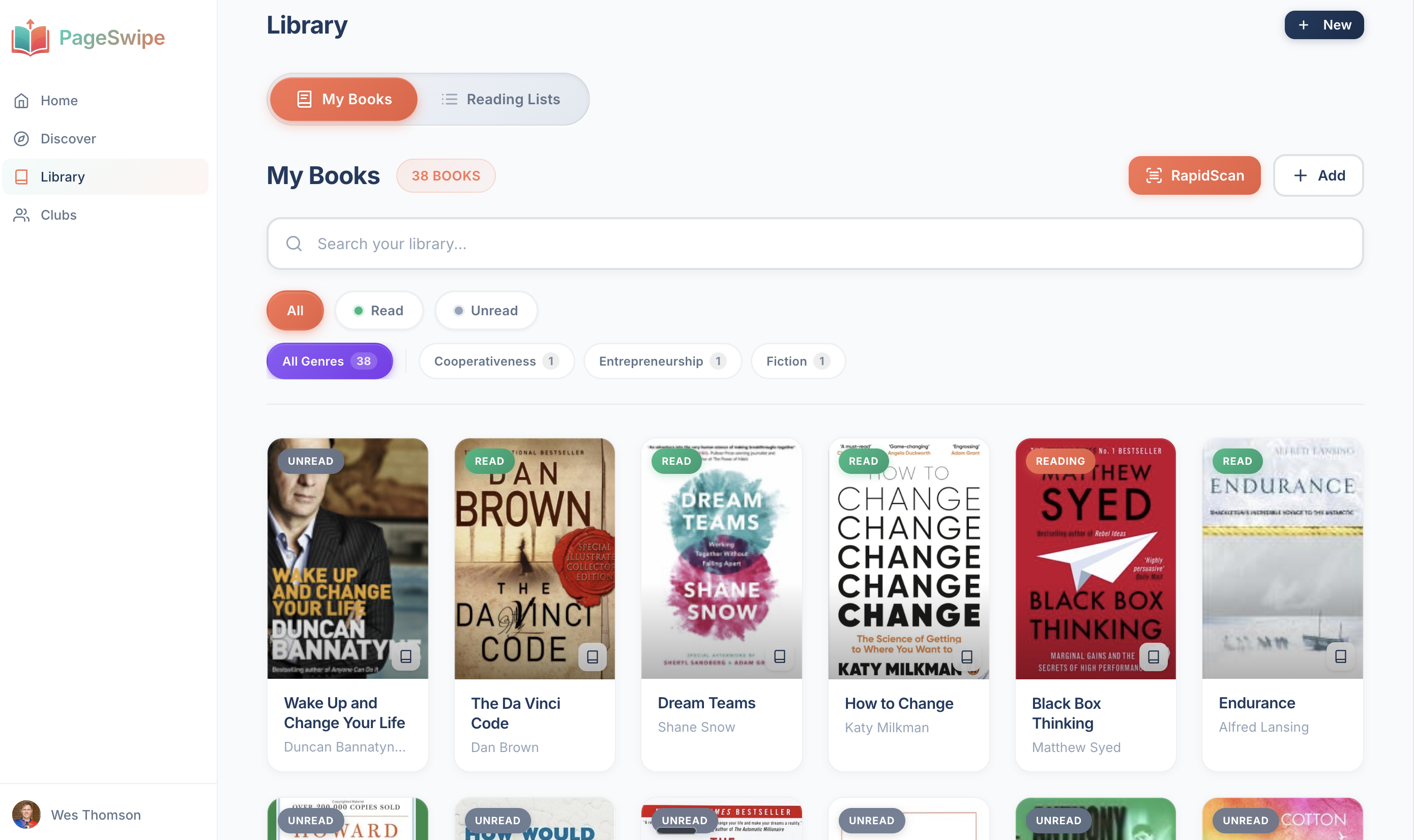
PageSwipe's RapidScan is built for continuous scanning: you point the camera, hear the confirmation, and the book drops into your library while you line up the next one. There is no stopping to save between books. As an illustrative benchmark, RapidScan can catalogue around 127 books in about 8 minutes in a good run — roughly a book every four seconds. (That figure is illustrative; real speed depends on lighting, barcode condition and how tightly your books are shelved.) At that rate, 500 books lands in well under an hour, and realistically inside 30–40 minutes once you find your rhythm.
Manual vs scanning: the time gap for 500 books
| Method | Illustrative pace | Time for 500 books | Typo risk |
|---|---|---|---|
| Type by hand (spreadsheet or form) | ~1.5–2 min per book | ~12.5–16.7 hours | High — manual entry |
| Scan ISBN barcodes (RapidScan) | ~4 seconds per book | Well under 1 hour | Low — data pulled from ISBN |
All figures illustrative. The point is the order of magnitude: scanning turns a weekend into a single sitting.
The shelf-by-shelf workflow
The single most important trick for a large collection is to never treat it as one giant pile. Break it into shelves. A shelf is a finish line you can actually reach, and each finished shelf gives you a small, real sense of progress that carries you to the next. Here is the workflow that gets 500 books done without burning out.
- Pick a starting shelf and commit to it. Top-left of the biggest bookcase is a good default. Do not skip around — order is what stops you losing your place at scale.
- Clear a small staging space. You want room to pull a book, scan it, and re-shelve or stack it as "done." A coffee table or the next shelf down works.
- Scan left to right, spine by spine. Keep the phone in one hand and pull books with the other. Listen for the confirmation rather than watching the screen — it keeps the pace up.
- Drop awkward books into a "later" pile. No barcode, a barcode that won't read, a box set — set it aside instead of stopping. One short batch at the end is far faster than solving each one mid-flow.
- Finish the shelf, then take the win. A whole shelf catalogued in a few minutes is the moment scanning sells itself. Mark it done and move to the next.
- Work in shelf-sized sessions. You do not have to do all 500 at once. Three or four shelves in a sitting, a few sittings across a week, and a large collection is fully catalogued without it ever feeling like a chore.
Because scanning is so quick per book, most people find they simply keep going — the shelf-by-shelf structure exists for the days you don't, so you can stop and resume without losing your bearings. For a collection this size, our companion guide on how to organize a large home library covers what to do once every book is in the system.
Handling the awkward cases
Every large collection has a tail of books that don't scan cleanly. Batching them is the trick — deal with the whole tail at once, after the easy 90% is done.
Books with no barcode
Older hardbacks, pre-1970 printings, imported editions and many gifts simply predate the ISBN barcode. Don't fight them mid-shelf. In your "later" pile, add each one by searching the title and author, or by typing the ISBN printed on the copyright page if there is one. A stack of 20 no-barcode books is a calm ten-minute job at the end — not 20 interruptions to your flow.
Duplicates
Scan duplicates rather than skipping them. Two copies of the same title are often two different editions — a hardback and a paperback, a first edition and a reprint — and both are worth recording, especially if you ever lend or track condition. Where you have a genuine exact duplicate, review the flagged pair at the end and decide whether to keep one entry or two. Doing this last means you never stall on a judgement call while a full shelf waits.
Box sets and multi-volume series
Box sets are the classic trap. Most carry one barcode on the outer slipcase and a separate barcode on each volume inside. Scan the individual volumes, not just the box — that way every book is searchable, lendable and countable on its own. A seven-volume set should show up as seven books, because that is what it is on your shelf and what a friend would want to borrow.
Damaged or unreadable barcodes
A creased or faded barcode sometimes won't read. Give it one more angle and better light; if it still won't scan, drop it in the "later" pile and add it by ISBN or title search with the rest. Not worth breaking stride over one stubborn spine.
Keeping momentum to the finish
The failure mode with 500 books is never the first shelf — it's the middle. Three things keep momentum:
- Never stop to solve a problem. Every pause to figure out a box set or a missing barcode costs more than the awkward book is worth in the moment. Pile and continue.
- Use the shelf as your unit of progress. "Two shelves left" is motivating in a way that "437 of 500" is not.
- Let the count climb. Watching your library grow past 100, 250, 400 is oddly satisfying — and because cataloguing is free and unlimited, there is no wall you hit where the app asks you to pay to keep going.
PageSwipe is a free platform for readers and authors: scanning, cataloguing, sharing, lending, clubs, collections, discovery, book pages, and launch clubs are not gated. PageSwipe earns revenue through book-native advertising with authors and publishing houses at scale.
What you get once the collection is in
Five hundred books catalogued is not the end — it is the point where a physical shelf becomes a connected digital library. You can search your own collection from your phone in a bookshop to avoid buying a book you already own. You can share a public library page — privacy-controlled — so friends can see what you have and ask to borrow. You can lend and track what's out. And because your library is real books you actually own, the recommendations that flow through PageSwipe come from people you know, not an algorithm.
If you're just deciding how to begin, our guide to cataloguing a home library walks through the basics from the first book. And the PageSwipe home library app page shows what the finished, connected library looks like in practice.
Frequently asked questions
How long does it take to catalog 500 books?
By hand, expect roughly 12 to 16 hours — an illustrative 1.5 to 2 minutes per book to look up, type and check each entry. By scanning ISBN barcodes continuously, the same 500 books take well under an hour. That gap is the whole reason people scan a large collection instead of typing it.
What is the fastest way to catalog a large book collection?
Scan the ISBN barcode on the back of each book in a continuous flow, one shelf at a time, and let the app pull the title, author and cover automatically. RapidScan in PageSwipe is built for exactly this — point, hear the confirmation, move to the next spine. Only fall back to manual entry for the handful of books with no barcode.
Is it free to catalog 500 books with PageSwipe?
PageSwipe is a free platform for readers and authors: scanning, cataloguing, sharing, lending, clubs, collections, discovery, book pages, and launch clubs are not gated. PageSwipe earns revenue through book-native advertising with authors and publishing houses at scale.
How do I catalog books that have no barcode?
Older hardbacks, pre-1970 books and many gifts predate the ISBN barcode. Set those aside in a small pile as you scan, then add them by searching the title or author, or by typing the ISBN printed on the copyright page. Handling them as one short batch at the end keeps your scanning rhythm unbroken.
How do I handle duplicates and box sets when cataloguing?
Scan everything first, including apparent duplicates — two copies of the same title are often different editions worth recording. Box sets usually carry one outer barcode plus a barcode on each volume; scan the individual volumes so each book is searchable and lendable on its own. Review flagged duplicates at the end rather than pausing mid-shelf.
Start with one shelf
You do not have to face all 500 at once. Pick the nearest shelf, open RapidScan, and scan the first spine. In a few minutes you'll have a shelf done and a very good sense of how fast the whole thing will go.
Scan your first book with RapidScan →
Or start from the PageSwipe homepage to see how a scanned shelf becomes a connected library.