How to Find Books on Your Shelves
By The PageSwipe Team · 17 May 2026
You know you own it. You can picture the cover. You remember lending it, or not lending it, or moving it "somewhere sensible" during the last tidy-up. And yet you are standing in front of your own shelves, tilting your head to read spines, and the book is nowhere. It is one of the small, particular frustrations of loving books: the more you own, the harder your own collection is to search.
This guide is about fixing that for good. Not with a bigger tidy-up that lasts a fortnight, but with a system — a light bit of physical order plus a searchable home library that tells you exactly which shelf a title is on. By the end you will be able to type a title into your phone and walk straight to the book.
The direct answer
To find any book on your own shelves, catalog your collection once and tag each book with its physical location — a room, a case, a shelf. Then, instead of scanning spines, you search the title or author in your catalog, read the location tag, and go straight there. The hunting disappears because you have separated two jobs that shelves force together: storing a book and finding it. Your shelves store; your catalog finds.
TL;DR
- The problem is search, not storage. Spines are a terrible index — small, sideways, and easy to walk past.
- Do a little physical organization so your shelves have a predictable logic (by room, author, or genre).
- Build a searchable catalog by scanning each book's ISBN barcode — far faster than typing.
- Add a location tag to every book: where it actually lives. This is the piece that ends the hunting.
- Search by title or author whenever you need something; the tag tells you which shelf to check.
- PageSwipe does all of this — unlimited cataloguing, free, with search and location tags built in.
Why you can't find a book you own
It helps to understand why a shelf full of books you chose, bought and read is still so hard to search. Three things work against you.
Spines are a bad index
A library book has a call number on the spine and lives in strict order. Your books have thin, inconsistent spines — some print the title top-to-bottom, some bottom-to-top, some too faintly to read from a metre away. Scanning them is slow, and slow scanning is where "I'll just grab it later" turns into a twenty-minute hunt.
Books move and you don't notice
Books migrate. One goes to the bedside table, another to a friend, a third onto a "to re-read" pile that never gets re-shelved. Every move quietly breaks whatever order you had, and there is no record of the change. Your memory of where a book should be stops matching where it is.
Volume outgrows memory
You can hold the rough location of fifty books in your head. At two hundred, four hundred, a thousand, memory stops being a filing system. This is the point where owners start buying second copies of books they already have — because it is genuinely easier to buy again than to find the original. (If that is you, our companion guide on how to avoid buying duplicate books tackles that head-on.)
How to find books on your shelves: the process
Here is the full setup, start to finish. It is a one-time job for an afternoon or two, and it pays off every single time you need a book afterwards.
- Give your shelves a simple, predictable logic. You do not need a perfect system — you need a consistent one. Pick the arrangement that matches how your brain reaches for a book: alphabetical by author, grouped by genre, or simply by room. The goal is that once you know a book's location tag, walking to it feels obvious. If your collection is large, our guide on how to organize a large home library walks through choosing a scheme that scales.
- Name your locations before you start. Decide how you will describe places, and keep it short and repeatable. "Living room · tall case · shelf 3." "Study · desk shelf." "Bedroom · top." Whatever vocabulary you choose, use it every time. Consistent location names are what make a tag readable at a glance six months later.
- Catalog each book by scanning its ISBN barcode. This is the step that turns a wall of spines into a searchable list. Nearly every book printed since the 1970s has an ISBN barcode on the back cover. A scanner reads the code and pulls the title, author and cover automatically, so you are not typing anything. Work shelf by shelf, left to right, so nothing gets missed. An illustrative shelf of 127 books can be captured in roughly eight minutes this way.
- Tag each book with where it lives as you go. This is the piece most catalogs skip and the reason most catalogs fail to end the hunting. As you scan a shelf, apply that shelf's location tag to every book on it. Because you are already standing there, it costs almost nothing — and it is the single most valuable field in your whole catalog.
- Handle the strays. Books on the bedside table, in the car, or lent to a friend still belong in the catalog — just give them an honest tag ("Lent · Sam" or "Bedside"). A borrowed-out book that shows up in search with a clear tag saves you from tearing the house apart for something that left it weeks ago.
- From now on, search first. When you want a book, do not walk to the shelves and start scanning. Open your catalog, type the title or author, read the location tag, and go straight there. This is the habit that makes the whole system worth it. Finding a book becomes a five-second lookup instead of a hunt.
Physical order versus a searchable catalog
People usually try one of two fixes: reorganize the shelves, or make a list. Each solves part of the problem. Together they solve all of it. Here is how they compare on the jobs that actually matter when you are trying to find a specific book.
| What you need | Physical organization alone | A basic list / spreadsheet | Searchable catalog + location tags |
|---|---|---|---|
| Find a specific title fast | Only if you remember the scheme | Yes, if you keep it updated | Yes — search by title or author |
| Know which shelf it's on | Yes, by walking to it | No, unless you add a column | Yes — the location tag says so |
| Survive books being moved | No — order breaks silently | Only if you edit the file | Yes — update one tag in seconds |
| Set-up effort | High, and needs redoing | High — typing every title | Low — scan barcodes |
| Check if you already own it (in a shop) | No | Only if the file is on your phone | Yes — search from anywhere |
The takeaway: physical order makes your shelves pleasant and predictable, but it cannot answer "where is this exact book right now" once things move. A searchable catalog with location tags can — and it is the version that survives real life, where books wander.
The location tag: the field that ends the hunting
If you take one idea from this guide, take this one. Most cataloging efforts record the title, the author, maybe a rating — and stop. That gives you a lovely list and still leaves you scanning spines, because the list never says where the book is. The location tag is the bridge between "I found it in my catalog" and "I am holding it."
Tags can be as coarse or as fine as you like:
- Room-level — "Study", "Bedroom", "Hallway". Coarse, but it already removes most of the searching, because you only scan one bookcase instead of the whole house.
- Case-level — "Living room · tall case". Now you are down to one piece of furniture.
- Shelf-level — "Living room · tall case · shelf 3". The book is in front of you the moment you arrive.
Start coarse if you want to; you can always sharpen a tag the next time you handle the book. Even room-level tags turn a twenty-minute hunt into a thirty-second walk.
Where PageSwipe fits
Everything above is doable by hand — a notebook and disciplined shelf logic will get you there. But the reason most people never quite finish is the friction of building and maintaining the catalog. PageSwipe is a home-library app built to remove that friction, so the searchable-library part actually gets done.
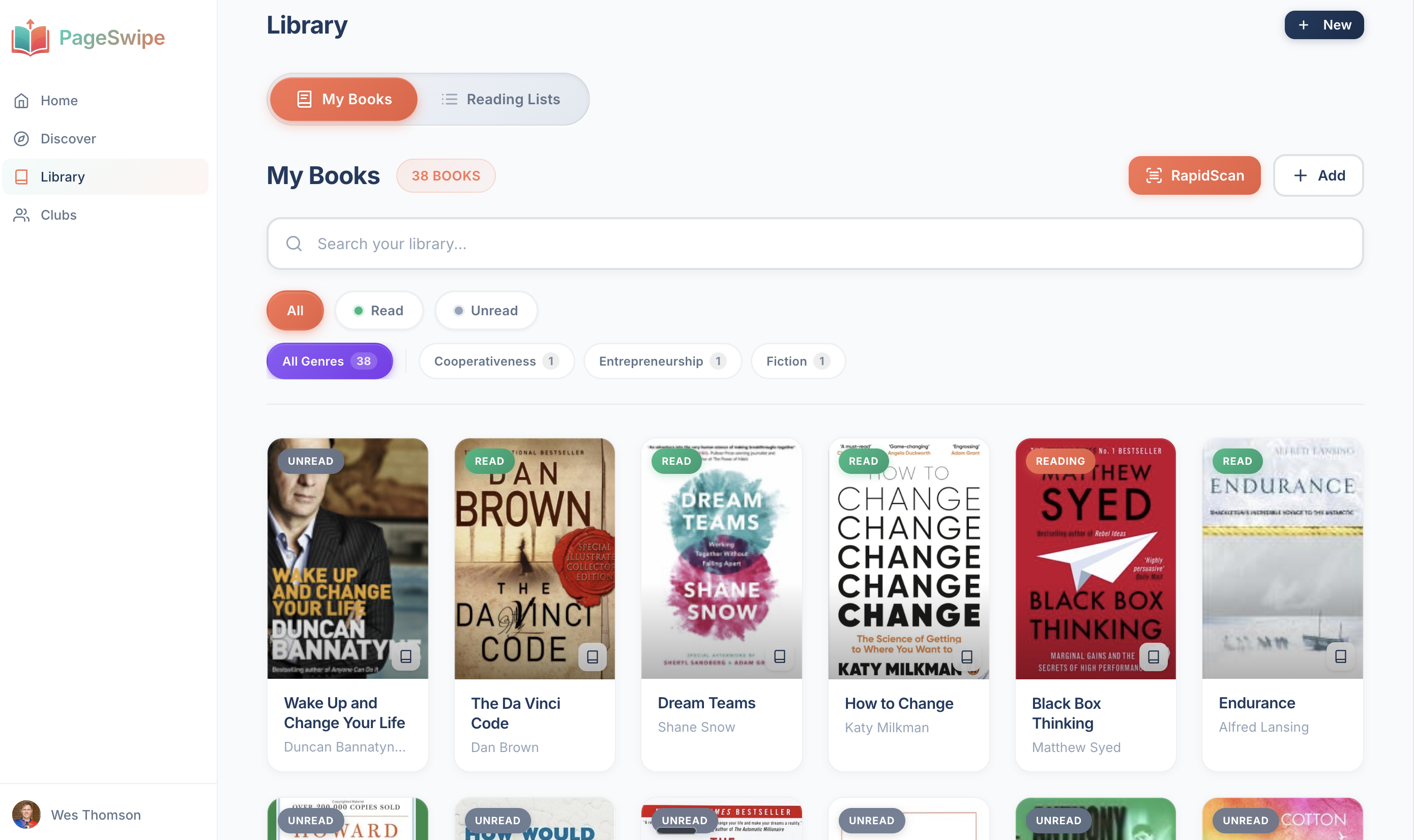
- RapidScan reads ISBN barcodes continuously — point at each spine's barcode and keep moving down the shelf. Title, author and cover fill in automatically, so a wall of books becomes a searchable list in minutes rather than an evening of typing.
- Location tags are built in. Tag a book, or a whole shelf at once, with where it lives — and every search result shows that tag, so finding a book is a lookup, not a hunt.
- Search by title or author runs across your entire library, wherever you are. That means you can also check, mid-shop, whether a tempting book is already on a shelf at home.
- It is free to build. Cataloguing is unlimited on the free tier — there is no cap on how many books you can add. Paid Collector features exist for people who want to track editions, purchase value and insurance backups, but making your library searchable is not gated.
If you already keep your books in a spreadsheet, PageSwipe can import it, so you keep the work you have done and gain scanning and search on top. And because your library can be shared (privacy-controlled) with people you trust, "where is that book" can extend to "who I know owns it" — but that is a story for another day. For now, the win is simple: any title you own, found in seconds.
Reader CTA
Stop hunting your own shelves. Start with a single book: point your phone at the barcode on the back, watch the title, author and cover appear, and give it a location tag. That is your searchable library begun.
Frequently asked questions
How do I find a book I know I own but can't locate?
Catalog your books once and tag each one with where it lives — a room, a bookcase, a shelf. After that you search the title or author in your catalog, read the location tag, and walk straight to the right shelf instead of scanning every spine in the house.
What is the fastest way to make my home library searchable?
Scan the ISBN barcode on the back of each book. A barcode scanner like RapidScan reads the code, pulls the title, author and cover automatically, and adds the book to a searchable list. An illustrative shelf of 127 books can be catalogued in about eight minutes this way — far faster than typing each title by hand.
Can I search my books by title or author?
Yes. Once your books are in a digital catalog, you can search by title, author, or keyword and jump to any book in seconds. In PageSwipe, that search runs across your whole home library, and each result shows the location tag you gave the book so you know exactly which shelf to check.
How do shelf and location tags work?
A location tag is a short label you attach to a book that records where it physically sits — for example "Living room, tall case, shelf 3" or "Bedroom, top shelf". When you search and find the book, the tag tells you where to walk. Tags are as coarse or as detailed as you want; even room-level tags remove most of the hunting.
Do I need to organize my shelves before cataloging them?
No. A searchable catalog with location tags works with whatever order your shelves are already in, because the tag records reality rather than an ideal. Light physical organization helps you keep tags accurate over time, but you can catalog first and tidy later.
Is there a free way to catalog and search my books?
Yes. PageSwipe lets you catalog an unlimited number of books for free and search them by title or author. Building a searchable library is part of the free tier — there is no cap on how many books you can add.
Keep going
- How to organize a large home library — choosing a shelf scheme that scales past a few hundred books.
- How to avoid buying duplicate books — using a searchable catalog to stop buying second copies.
- The PageSwipe home-library app — scan, tag and search your whole collection.
- PageSwipe — scan your bookshelf, connect your library.