Best Book Barcode Scanner Apps
By The PageSwipe Team · Published 23 April 2026
The best book barcode scanner app reads the ISBN barcode on the back of a book with your phone camera, then instantly auto-fills the title, author, cover, publisher and year from a book database — so you build a catalogue by pointing, not typing. The difference between a good one and a frustrating one comes down to five things: scanning speed, whether it scans continuously, accuracy, how well it works offline, and how deep its book database goes.
TL;DR
- A book barcode scanner app reads the ISBN barcode and looks it up, so metadata fills in automatically.
- Judge one on: speed, continuous (batch) scanning, accuracy, offline support, and database coverage.
- Continuous scanning is the feature that turns an afternoon of typing into a few minutes of pointing.
- Options range from spreadsheets (free but manual) to dedicated cataloguing apps to connected-library apps.
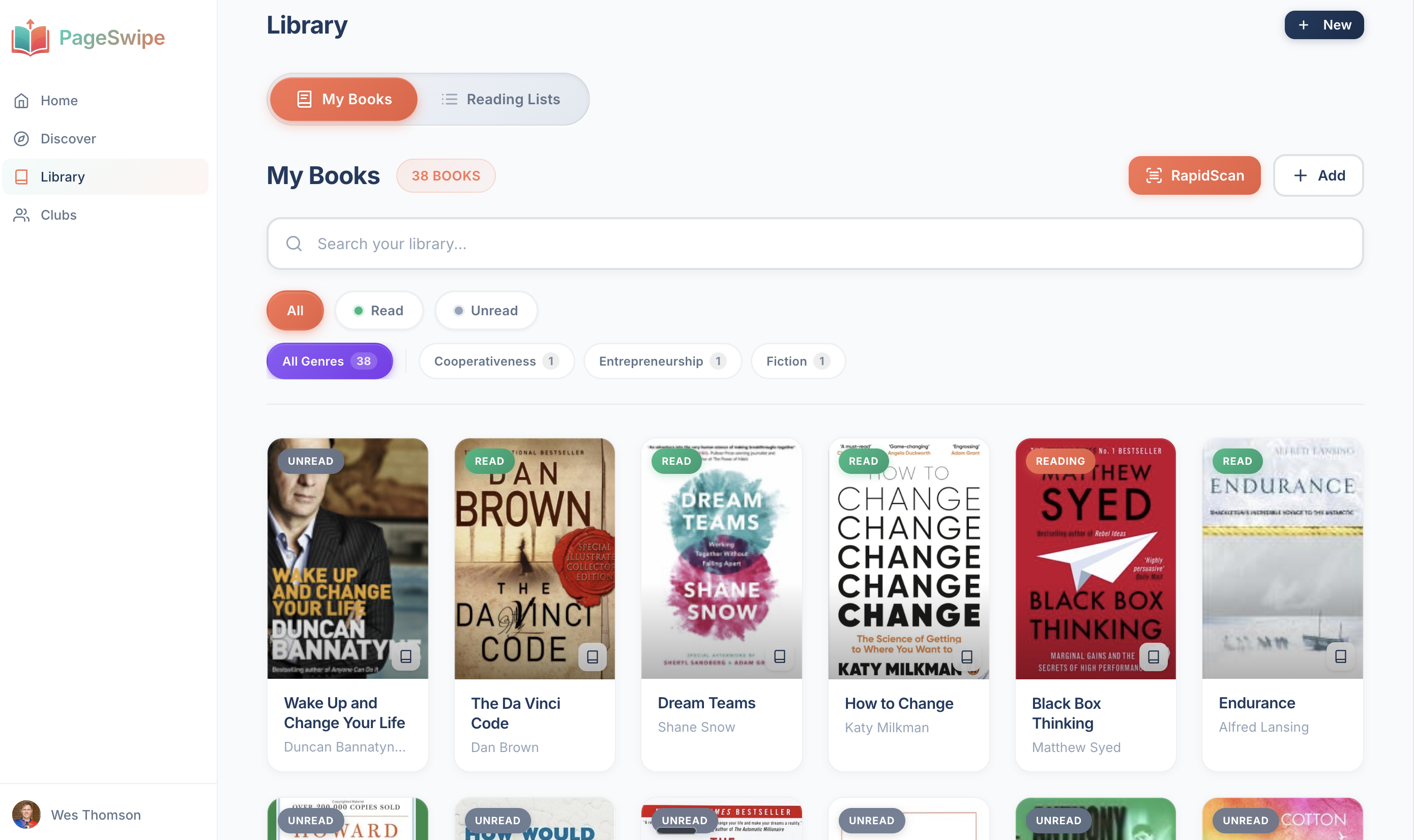
- PageSwipe's RapidScan scans continuously to build your library fast — free, with unlimited books — and that library is then something you can share, lend and browse, not just a static list.
What a book barcode scanner app actually does
Every printed book since the early 1970s carries an ISBN — the International Standard Book Number — encoded as the barcode on the back cover (usually the EAN-13 barcode that starts with 978 or 979). That number is a unique key for that edition of that title.
A book barcode scanner app does three things in sequence, faster than you can read this sentence:
- Reads the barcode. Your phone camera detects the ISBN barcode and decodes the number.
- Looks it up. The app sends that ISBN to a book database and gets back the record — title, author, cover image, publisher, publication year, sometimes page count and description.
- Creates the entry. Those details drop into your library as a finished record. You didn't type a word.
Multiply that by a shelf and you understand the appeal. Manually cataloguing 300 books is a weekend of squinting at copyright pages. Scanning them is an evening with a podcast on. For a step-by-step walkthrough of the scanning itself, see our guide on how to scan ISBN barcodes.
What makes a good book barcode scanner (the five things that matter)
Most scanner apps can read a barcode. What separates a good one from one you abandon halfway down the first shelf is how it behaves across a real cataloguing session.
1. Speed per book
The single most important factor. A slow lookup — even two or three seconds of waiting per book — is death by a thousand cuts across a large collection. The best apps decode and fill in well under a second, so the bottleneck is you turning the next book over, not the software.
2. Continuous (batch) scanning
This is the feature people don't know to ask for and then can't live without. With continuous scanning, you don't tap "scan", frame one book, confirm, and repeat. You hold the camera up and move from spine to spine; the app captures each book and immediately readies itself for the next. It is the difference between cataloguing one book at a time and cataloguing a shelf in one motion.
3. Accuracy and de-duplication
A good scanner matches the right edition and warns you when you've already added a title, so you don't end up with three copies of the same book in your catalogue. Accuracy also means gracefully handling the barcode that won't read — offering a manual ISBN entry or a title search instead of just failing.
4. Offline capability
Bookshelves are often in back rooms, basements and box rooms with poor signal. An app that queues scans offline and syncs the lookups later lets you keep moving instead of standing in the one corner of the house with a bar of reception.
5. Database coverage
The lookup is only as good as the database behind it. Broad coverage matters for translations, academic titles, older editions and non-English books. When a scanner returns "no match" a lot, it's usually a thin database rather than a bad camera.
Your options, compared fairly
There is no single "best" for everyone — the right tool depends on whether you want a plain inventory, a serious collector's ledger, or a library you can actually do something with. Here is an honest look at the main categories. (Feature notes are general and illustrative; check each app's current details before you commit a large collection.)
| Category | Barcode scanning | Best for | Where it's stronger | Where it's weaker |
|---|---|---|---|---|
| Spreadsheet (Excel / Google Sheets) | None — manual entry | People who want total control and zero cost | Free, infinitely customisable, yours forever | No scanning; every field typed by hand; no covers |
| Dedicated cataloguing apps (e.g. Libib, BookBuddy) | Yes — usually one-at-a-time or batch | Building a clean personal inventory | Purpose-built cataloguing; tags, shelves, export | Often a solo, static list; social/lending features are limited |
| Reading-tracker apps (e.g. Goodreads, StoryGraph) | Yes — for adding to shelves | Tracking what you've read and want to read | Huge communities, reviews, reading stats | Built around reading status, not "what I physically own and can lend" |
| Library / collector software (e.g. LibraryThing) | Yes | Cataloguers who love metadata depth | Rich cataloguing data, cross-references, expertise | Interface can feel dense; steeper learning curve |
| Connected-library apps (PageSwipe) | Yes — RapidScan continuous scanning | Building a library fast, then sharing and lending it | Fast batch scanning; free unlimited cataloguing; the library connects to people you trust | Newer; the network is most useful once your circle joins too |
A fair summary: if you want the deepest bibliographic metadata, a dedicated cataloguing tool like LibraryThing is genuinely strong. If you live inside reviews and reading stats, Goodreads' community is unmatched. If you want a plain personal inventory and nothing more, Libib does that cleanly. Where PageSwipe is different isn't "better scanning for scanning's sake" — it's that the catalogue you build is a connected library you can share and lend from, not a list that just sits there.
How PageSwipe's RapidScan works
RapidScan is PageSwipe's continuous ISBN barcode scanner. You open it, hold your phone over the back of each book, and move down the shelf. Each ISBN is read and its details filled in automatically; the scanner is ready for the next book before you've set the last one down. There's no "scan → confirm → scan again" rhythm to break your flow — you keep moving, it keeps catching.
To put the pace in perspective with an illustrative example: a reader scanning a full bookcase might catalogue 127 books in about 8 minutes. Your own speed depends on how quickly you can turn each book over — but the point is that the app is no longer the thing slowing you down.
When a barcode won't read — an old paperback, an import, a library-bound copy — you can type the ISBN, search by title, or add the book manually, so nothing on your shelf gets left out. And because cataloguing is free and unlimited in PageSwipe, there's no cap forcing you to stop at an arbitrary number of books.
The part that makes the scanning worth it comes after: once your books are in, your library is something you can share as a beautiful public page, lend from, and browse alongside the shelves of people you trust — "your friend owns this, rated it, and can lend it to you." A barcode scanner gets the books in. PageSwipe is about what you can do with them once they're there. If you're weighing up the full picture, our roundup of the best home library apps compares the wider field.
A simple process to catalogue your shelves
- Pick your tool. If you want a scan-first, shareable library, start with a barcode scanner app like PageSwipe's RapidScan. If you already have a list, import it (see below) instead of re-scanning.
- Work shelf by shelf. Don't try to do the whole house at once. One shelf per session keeps it satisfying and reduces mistakes.
- Scan continuously. Hold the camera to the barcode on each back cover and move along the row. Let the app fill in the details.
- Handle the misses as you go. For any book that won't scan, type the ISBN or search by title on the spot rather than leaving a pile for later.
- Review and tag. Once a shelf is in, skim for duplicates and add any tags, rooms or shelf labels you want.
- Do something with it. Share the library, mark what's available to borrow, or invite the people you lend to.
Want the barcode step in more detail — including where to find the ISBN and what to do with books that predate barcodes? Read how to scan ISBN barcodes.
Frequently asked questions
What does a book barcode scanner app do?
A book barcode scanner app uses your phone's camera to read the ISBN barcode printed on the back of a book, then looks that number up in a book database and auto-fills the title, author, cover, publisher and year. Instead of typing every detail, you point the camera and the entry appears.
Do I need a separate barcode scanner device?
No. For a home library, your phone camera is enough. A dedicated laser scanner is faster for very large or professional collections, but for a few hundred books a good app scanning continuously will keep pace with how quickly you can turn each book over.
What if a book has no barcode or the scan fails?
Older books, many pre-1970 titles and some imports have no printed ISBN barcode. A good app lets you type or paste the ISBN by hand, search by title, or add a manual entry, so a missing barcode never stops you cataloguing the book.
Is PageSwipe's book barcode scanner free?
PageSwipe is a free platform for readers and authors: scanning, cataloguing, sharing, lending, clubs, collections, discovery, book pages, and launch clubs are not gated. PageSwipe earns revenue through book-native advertising with authors and publishing houses at scale.
Can I move my existing spreadsheet or Goodreads list in?
Yes. If you already have a list, you can import from Goodreads or a spreadsheet rather than re-scanning everything, then use the barcode scanner only for the books that aren't on the list yet.
Start with one shelf
The best book barcode scanner is the one that gets your shelves into a catalogue you'll actually use. See how continuous scanning feels on the PageSwipe book barcode scanner, or read up on the underlying ISBN scanner that powers it.
Scan your first book with RapidScan →
New to PageSwipe? Start at pageswipe.tech — scan your bookshelf, then connect your library.