Best Goodreads Alternatives
By The PageSwipe Team · 14 June 2026
Goodreads has been the default reading app for so long that "an alternative to Goodreads" can mean five different things depending on what you actually want. Some readers want prettier reading stats. Some want a quieter, less cluttered space. Some want to catalogue the physical books they own rather than log what they have read. This is an honest look at the best Goodreads alternatives, what each one is genuinely good at, and — because it matters — where Goodreads itself is still the stronger tool. PageSwipe is one of the options here, and we will tell you plainly when it is the wrong pick.
The short answer
There is no single best Goodreads alternative, because Goodreads does several jobs at once and no one app replaces all of them. Choose StoryGraph if you want reading stats, mood and pace tracking, and smarter recommendations. Choose Libib if you want to catalogue books alongside films, music and games. Choose LibraryThing if you want the deepest catalogue data and a community of serious collectors. Choose BookBuddy if you are on iOS and want rich per-book detail. Choose PageSwipe if your goal is cataloguing the books you physically own and sharing, lending or running clubs with people you actually know.
TL;DR
- StoryGraph — best for reading stats, mood tracking and recommendations; the closest "read-and-review" replacement.
- Libib — best for cataloguing mixed media (books, movies, music, games) in one place.
- LibraryThing — best for catalogue depth, tagging and a collector community.
- BookBuddy — best for iOS users who want detailed records and loan tracking per book.
- PageSwipe — best for cataloguing what you own with fast RapidScan, then sharing, lending and running clubs with people you trust.
- Goodreads (still strong) — unmatched database size, review volume and social reach. Do not underrate it.
First, be honest about where Goodreads still wins
Before you switch, it is worth saying plainly what you would be giving up. Goodreads is old and the app can feel slow, but it is dominant for real reasons:
- Database size. Its catalogue of titles, editions and author pages is enormous. Newer apps sometimes miss an obscure edition that Goodreads already has.
- Reviews at scale. Millions of ratings and written reviews mean that when you want the crowd's read on a book, few places come close.
- Social reach. Most of your reading friends are probably already there, along with reading challenges and a familiar feed.
- It is free. The core experience costs nothing.
So the honest framing is not "Goodreads is bad, replace it." It is: Goodreads is a reviews-and-discovery giant, and if that is the job you care about most, you may not need to leave at all. The alternatives below win when your job is different — better stats, a quieter space, or cataloguing what you own.
How to choose a Goodreads alternative
Decide which of these jobs you are really hiring the app to do. Most people care about two or three, not all five.
- Reading stats and mood. Do you want charts of pace, genre, mood and page counts, or is that noise to you?
- Cataloguing what you own. Do you need to know which physical copies sit on your shelves, where they are, and who borrowed them?
- Reviews and discovery. Do you want a large crowd's ratings and social recommendations, or a quieter, more personal tool?
- Sharing and lending. Do you want a private log, a public shelf, or the ability to lend to friends and track loans?
- Import. Do you already have a Goodreads CSV export or a spreadsheet you want to bring across?
Hold each option up against those five and the choice gets much simpler. Here is how the main alternatives land.
The best Goodreads alternatives, compared
StoryGraph
StoryGraph is the alternative most readers reach for first, and for good reason: it is built around reading stats and mood. It tracks pace, page counts, genres, and the emotional tone of what you read, then uses that to suggest books that match how you actually like to read. Its recommendations lean on your habits rather than on what is trending, which many readers find refreshing after Goodreads. It has a free tier and a paid Plus tier.
Where StoryGraph is stronger than PageSwipe: reading analytics and mood-based tracking are its whole point, and PageSwipe does not try to compete there. If you want charts of your reading year, per-book mood tags, and recommendations tuned to your taste, StoryGraph is the better tool by a wide margin. It is also the more natural swap if your core habit is logging and reviewing what you read. Check current pricing for Plus.
Libib
Libib is a clean, well-liked cataloguing tool with a strength most reading apps lack: it handles books, movies, music and video games in the same library. If your collection is broader than books, Libib is hard to beat. It offers barcode scanning, a free tier many hobbyist collectors never outgrow, lending features, and the option to publish a library others can browse.
Where Libib is stronger than PageSwipe: multi-media cataloguing. PageSwipe is built for books; if you want your Blu-rays and vinyl in the same catalogue, Libib is the better home. Its free and Pro tiers differ in features — check current pricing.
LibraryThing
LibraryThing is the connoisseur's choice. It offers deep catalogue data, powerful tagging, connections to library catalogues around the world, and a community of serious collectors and cataloguers who genuinely care about editions and records. For depth and data quality it is exceptional, and it predates most of the field.
Where LibraryThing is stronger than PageSwipe: raw catalogue depth, tag power, and its collector community. The trade-off is a busier, more dated interface and a steeper learning curve — the price of all that capability. Check current pricing for its plan.
BookBuddy
BookBuddy is a long-standing favourite on iOS for readers who want detail. You can record rich metadata for every copy, add custom fields, track loans, mark reading status, and export your data. For someone who treats a catalogue like a card index and wants every field filled, it is thorough and polished.
Where BookBuddy is stronger than PageSwipe: depth of per-book detail, offline on-device control, and a mature loan tracker. If you love granular metadata and custom fields, BookBuddy gives you more knobs. Note it is iOS-focused, so it is less useful across a mixed-device household. Check current pricing for its full-feature version.
PageSwipe
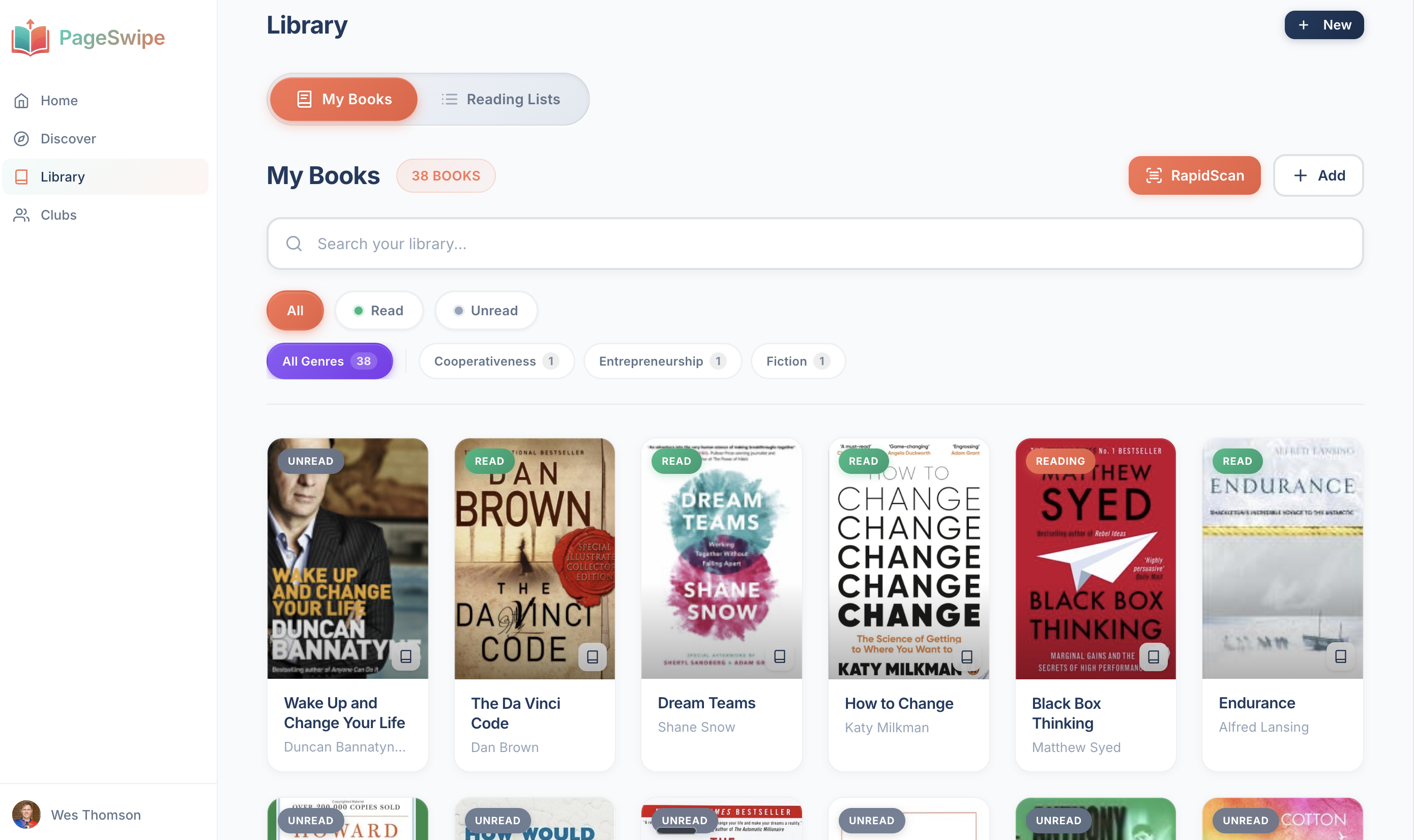
PageSwipe takes a different angle from all of the above. Instead of being a reading log or a private database, it treats your library as a connected library network — beginning with your own bookshelf. You build the catalogue fast with RapidScan, continuous ISBN barcode scanning, then you can share your library, lend and borrow, and run book clubs with people you trust.
PageSwipe is a free platform for readers and authors: scanning, cataloguing, sharing, lending, clubs, collections, discovery, book pages, and launch clubs are not gated. PageSwipe earns revenue through book-native advertising with authors and publishing houses at scale.
The real differentiator is not an algorithm recommending strangers' books. It is the simple, human fact that your friend owns this title, rated it, and can lend it to you. If you have moved on from Goodreads and want your own shelves to become something you and the people around you can actually use, that is what PageSwipe is for. It also imports from Goodreads and from spreadsheets, so an existing list comes across without re-scanning.
Where PageSwipe is NOT the right pick
Because the point of this piece is honesty, here is where you should choose something else:
- You mainly want reading statistics. If charts of pace, mood and genre are the reason you are switching, use StoryGraph. PageSwipe is not a stats tool.
- You want a huge review database. If you rely on thousands of ratings and written reviews per book, Goodreads still wins on sheer volume, and PageSwipe is not trying to replace that.
- You catalogue more than books. Films, music and games belong in Libib, not PageSwipe.
- You want maximum per-book metadata depth. LibraryThing or BookBuddy will give you more fields and finer control.
PageSwipe is the connected-library option, not the reviews-or-stats option. If those are your priority, one of the tools above will serve you better, and there is nothing wrong with using two apps for two different jobs.
Comparison table
A quick side-by-side on the dimensions that usually decide it. Features and pricing change, so treat this as a starting map and confirm current specifics on each app's own site.
| App | Best for | Reading stats | Catalogue what you own | Sharing / lending | Import |
|---|---|---|---|---|---|
| Goodreads | Reviews & social discovery | Basic | Not really — it tracks reading | Public profile; no lending | CSV export available |
| StoryGraph | Stats, mood & recommendations | Excellent | No — it tracks reading | Buddy reads; no lending | Imports Goodreads CSV |
| Libib | Mixed-media cataloguing | Limited | Yes | Publish library + lending | Import supported |
| LibraryThing | Catalogue depth & collectors | Some | Yes (deep data) | Public catalogue; limited | Strong import options |
| BookBuddy | Detailed records on iOS | Some | Yes | Loan tracker | Import / export supported |
| PageSwipe | Connected library you own & share | No (by design) | Yes — fast RapidScan, free unlimited | Share + lend with people you know | Goodreads + spreadsheet |
Illustrative summary only. Pricing and features are set by each app and change over time — always check current pricing and current feature lists before deciding.
So which should you pick?
Match the app to the job, not the other way round:
- You want better reading stats and mood tracking → StoryGraph.
- You want reviews and a big social crowd → stay on Goodreads, honestly.
- You catalogue films and music too → Libib.
- You want the deepest catalogue data → LibraryThing.
- You want detailed per-book records on iOS → BookBuddy.
- You want to catalogue what you own and share, lend and run clubs with people you know → PageSwipe.
Plenty of readers use two apps: a reading tracker for what they have read, and a home library app for what they own and lend. That is a sensible setup, not a compromise.
Switching without losing your list
Whatever you choose, you do not have to start from zero. Goodreads lets you export your whole library to a CSV file, and most alternatives can read it. If you land on PageSwipe, the Goodreads import brings that list straight in, and you can top it up by scanning any physical books that were never on Goodreads. For a tool built around cataloguing what you own and sharing it with people you trust, that is exactly what the PageSwipe home library app is for. You can read more about the wider approach at pageswipe.tech.
If you are still weighing options, two companion guides go deeper: our roundup of the best book tracking apps compares the read-and-log tools head to head, and our guide to Goodreads alternatives for book clubs covers the specific case of running a group.
Frequently asked questions
What is the best alternative to Goodreads?
There is no single best alternative for everyone, because Goodreads does several jobs at once. If you want reading stats and mood-based tracking, StoryGraph is the strongest choice. If you want to catalogue mixed media, Libib fits. If you want deep catalogue data, LibraryThing leads. If you want rich per-book detail on iOS, BookBuddy works well. If your goal is cataloguing the books you physically own and sharing or lending them with people you know, PageSwipe is the better fit.
Is there a free Goodreads alternative?
Yes. StoryGraph, Libib and PageSwipe all have free tiers. PageSwipe includes unlimited book cataloguing at no cost with no per-book cap, plus free library sharing, lending and clubs. StoryGraph offers free reading tracking and stats, with a paid Plus tier for extra features. Always check each app's current pricing before you commit.
Why do people leave Goodreads?
Common reasons are a dated interface, a slow app, cluttered data, and a wish for better reading stats or a quieter, more personal experience. That said, Goodreads is still strong on scale — its book database, review volume and social reach are hard to match, so many readers keep it for reviews while using another tool for their own shelves.
Can I move my books from Goodreads to another app?
Yes. Goodreads lets you export your library to a CSV file, and most alternatives can import it. PageSwipe imports from Goodreads and from spreadsheets, so you can bring an existing list across rather than re-scanning everything. Import options differ between apps, so check each one before switching.
What is the difference between Goodreads and a home library app?
Goodreads is built for tracking what you read and reviewing it socially. A home library app is built for cataloguing the physical copies you own, so you can search your shelves, avoid duplicates and lend books. They are different jobs, and many readers use one of each.
Start with your own shelf
The best Goodreads alternative is the one that does the job you actually came for. If that job is turning your own shelves into something searchable, shareable and lendable — rather than another reading log — the quickest way to judge it is to catalogue a single shelf and see how it feels.
Scan your first book with RapidScan and watch your bookshelf become a connected library — free, and with no cap on how many books you add.