Home Library App vs Spreadsheet
By The PageSwipe Team · 6 June 2026
If you want to catalogue the books you own, you'll almost always land on the same two choices: a spreadsheet you build yourself, or a dedicated home library app. Both work. Both give you a searchable record in the end. The honest answer to "which is better" is that they win at different things — a spreadsheet wins on cost, control and flexibility, and an app wins on speed, sharing and staying up to date. This guide compares them fairly, so you can pick the one that fits how you actually live with your books.
We build a home library app, so treat this as a comparison written by an interested party — but a fair one. There are collections and temperaments a spreadsheet genuinely suits better, and we'll say so plainly before we make the case for scanning into an app.
The short answer
Use a spreadsheet when the record is mostly for you, it doesn't need to change often, and you value owning a plain file more than you value convenience. Use a home library app when you have more than a shelf or two, you'll add and lend books over time, and you want to find, share and manage them from your phone. The deciding factors are how much typing you're willing to do and whether the catalogue needs to do anything beyond existing.
Where a spreadsheet genuinely wins
It's easy to dismiss the humble spreadsheet, and wrong to. For a lot of people it's the right tool, and its advantages are real and durable.
- It's free, forever. Google Sheets costs nothing, and most people already have Excel or Numbers. There's no plan, no upgrade prompt, no trial that expires.
- You own the file outright. A
.xlsxor.csvon your own drive can't be taken away, paywalled, or lost because a company shut down. In ten years it will still open. That kind of permanence is genuinely hard to beat. - It works completely offline. No account, no login, no internet. Open the file, edit it, close it. For anyone wary of putting a list of their belongings online, that matters.
- It's endlessly flexible. Want a column for the friend who recommended each book, a colour code for "unread", or a pivot table of authors by decade? A spreadsheet bends to any shape you can imagine. No app will ever match a blank grid for raw customisation.
- No learning curve you don't already have. If you can type into a cell, you can start today. There's nothing new to learn and no one else's idea of how a catalogue "should" work to fight against.
- Total control over your data. Sort it, back it up, email it to yourself, print it. It's just a file. Nobody's algorithm is deciding what you see.
If those points describe what you want — a private, free, permanent, fully-yours list — a spreadsheet is a perfectly respectable answer, and you don't need us to talk you out of it. If you'd like a head start, we publish a free home library spreadsheet template with the columns already set up.
Where a home library app wins
An app earns its place the moment cataloguing stops being a one-off and starts being something you live with. The gaps a spreadsheet leaves are exactly the things an app is built for.
- Speed — the big one. Modern books carry a barcode encoding the ISBN, the unique identifier for that edition. An app reads it with your phone camera and fills in the title, author, cover and publication details automatically. You point, it beeps, you move to the next spine. A shelf that takes an hour to type is a few minutes of scanning.
- Automatic, accurate metadata. No typos, no misremembered subtitles, no hunting for the publication year. The details come from the ISBN, so every entry is consistent and correct — and you get cover images a spreadsheet can't easily hold.
- Search in your pocket. Standing in a bookshop wondering if you already own a title? An app on your phone answers in two seconds. A spreadsheet on your home computer can't help you there — which is how duplicates get bought.
- Sharing and lending. An app can show friends a privacy-controlled public library page, track who has borrowed which book, and handle "ask to borrow" requests. A spreadsheet has no idea a book has left your house.
- Clubs and community. The better apps let you create or join book clubs, recommend titles, and vote on what to read next — things a static file simply can't do.
- It stays current with almost no effort. Scan a new book before it hits the shelf and the catalogue updates itself. Spreadsheets tend to go stale because keeping them current is a manual chore.
The through-line is that an app turns a record into something you can use — from anywhere, with other people. If your books are meant to be lent, shared and found, that's the difference that counts.
Head-to-head: the honest comparison
Here's the direct comparison, feature by feature. We've marked which tool wins each row, and where it's genuinely a draw.
| What you care about | Spreadsheet | Home library app | Winner |
|---|---|---|---|
| Cost | Free (tools you likely own) | Free tiers exist; some features paid | Spreadsheet |
| Data ownership | A file you keep forever | Depends on export; good apps let you export | Spreadsheet |
| Works offline / no account | Yes, entirely | Usually needs an account and connection | Spreadsheet |
| Custom fields and structure | Unlimited — any column you invent | Fixed fields, plus some custom tags | Spreadsheet |
| Speed of entry | Slow — type every field | Fast — scan the ISBN, details auto-fill | App |
| Cover images | Fiddly to add and store | Automatic with each scan | App |
| Search on your phone | Awkward on mobile | Built for it | App |
| Sharing a public library | Email a file; no live page | Privacy-controlled shareable page | App |
| Tracking borrowed / lent books | Manual, easily forgotten | Built-in status and borrow requests | App |
| Book clubs and recommendations | Not possible | Create or join clubs, vote, recommend | App |
| Learning curve | None if you know spreadsheets | Small — learn one new app | Draw |
Read the table honestly and a pattern appears. The spreadsheet wins on ownership, cost and control. The app wins on everything to do with using the collection — speed, mobility, sharing, lending and community. Which column matters more is a question only you can answer, and it comes down to whether your catalogue is a private archive or a living thing you interact with.
Which should you choose? Match it to your situation
Rather than a blanket verdict, here's how the choice usually breaks down by the kind of book owner you are.
| If you're… | Better fit | Why |
|---|---|---|
| Cataloguing one small shelf, once | Spreadsheet | Low volume, no need for sharing — the free file is enough |
| A tinkerer who loves custom columns and formulas | Spreadsheet | Nothing beats a blank grid for bending to your own system |
| Privacy-first, offline, own-your-file minded | Spreadsheet | No account, nothing online, total control |
| Facing a few hundred (or thousand) books | App | Scanning turns days of typing into an evening or two |
| Someone who lends books and forgets who has them | App | Borrow tracking and status fields stop books vanishing |
| Wanting friends to browse or borrow from your shelves | App | A shareable library page and clubs are built in |
| Prone to buying duplicates in shops | App | Your whole catalogue is searchable from your phone |
Notice you don't have to choose forever. Plenty of people start in a spreadsheet, get a hundred books deep, and hit the wall where every new entry feels like a chore. That's the natural moment to move to an app — and, crucially, you can bring the spreadsheet with you rather than starting again. We walk through that transition in how to replace a book spreadsheet with an app.
You're not locked in: start in one, move to the other
The most reassuring thing about this decision is that it isn't permanent. A spreadsheet is the most portable format there is, which means it's also the easiest thing to import. If you've already built a book spreadsheet and it's getting tedious, you don't lose that work by switching.
PageSwipe imports an existing spreadsheet directly. You upload your file at pageswipe.tech/spreadsheet-import, map your columns to fields like title, author and ISBN, and your catalogue comes across — then you carry on by scanning any new books. So the honest framing isn't "spreadsheet or app forever." It's: start wherever suits you now, and upgrade when the spreadsheet stops paying its way.
The case for PageSwipe, if you want the app route
If the app column is winning for you, here's what PageSwipe does specifically — claimed plainly, with the free model stated accurately.
Its RapidScan feature does continuous ISBN-barcode scanning: move down a shelf pointing your phone at each spine, and it reads the barcode and fills in the title, author and cover as your searchable library builds itself. As an illustrative example, a shelf of about 127 books can come together in roughly eight minutes of continuous scanning — the kind of pace that makes cataloguing a whole home realistic rather than a someday project.
PageSwipe is a free platform for readers and authors: scanning, cataloguing, sharing, lending, clubs, collections, discovery, book pages, and launch clubs are not gated. PageSwipe earns revenue through book-native advertising with authors and publishing houses at scale.
And because it imports your spreadsheet, choosing PageSwipe doesn't throw away the work you've already done. You get the spreadsheet's history and the app's speed and sharing.
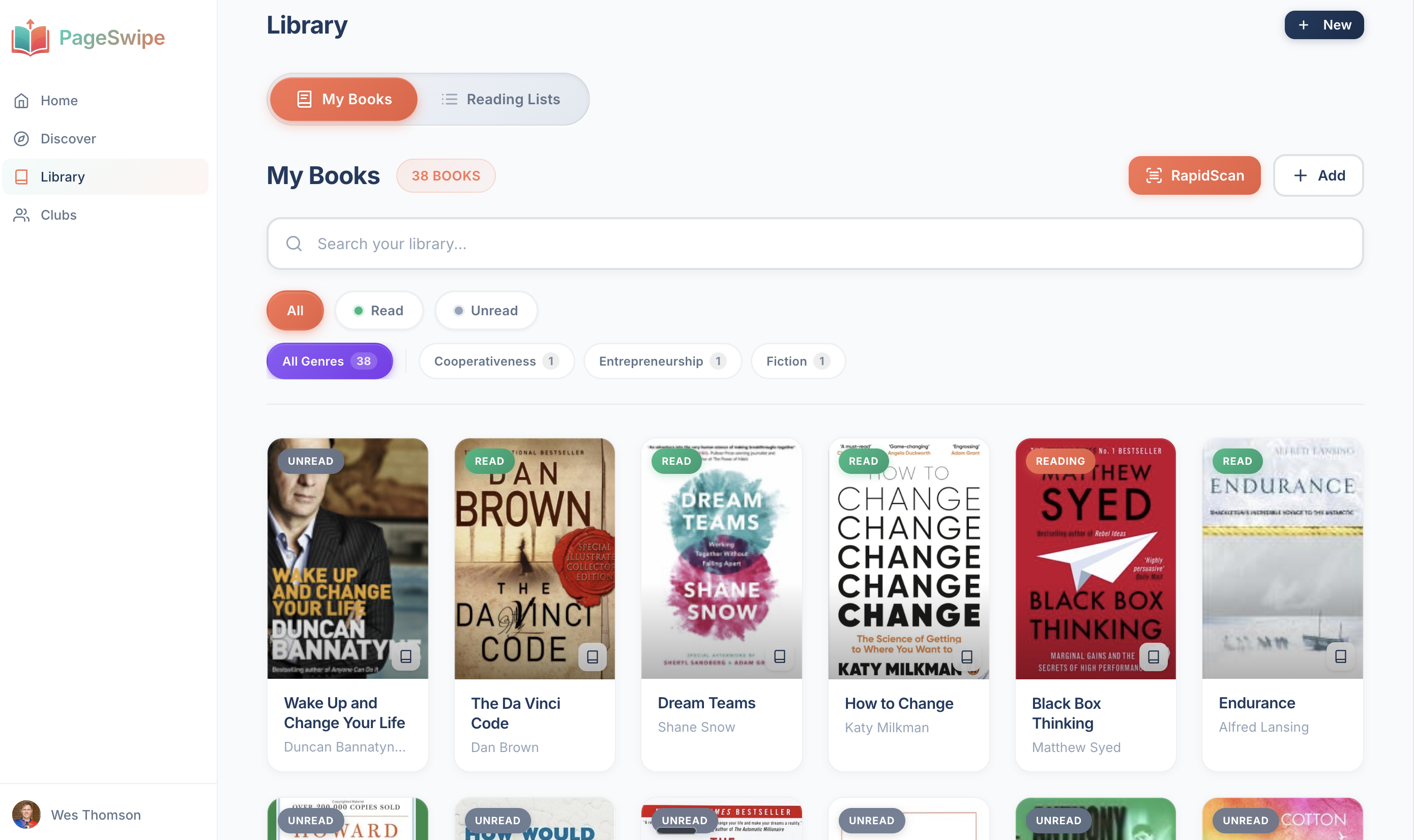
Want to feel the speed difference? Scan your first book with RapidScan and see a title fill itself in. Learn more on the home library app page, or bring your existing file across at spreadsheet import.
Frequently asked questions
Is a spreadsheet or an app better for cataloguing books?
It depends on what you want from the record. A spreadsheet is better if you want something free, fully offline, endlessly customisable and entirely under your own control, with no account required. An app is better if you want speed — barcode scanning that fills in details automatically — plus search on your phone, cover images, and the ability to share or lend books. For a small collection you'll rarely touch, a spreadsheet is fine. For a growing collection you want to use and share, an app usually wins.
What does a spreadsheet do better than a book app?
A spreadsheet is free, works completely offline, needs no account, and gives you total control. You can add any column you like, restructure it however you want, and the file is yours to keep or export forever with no risk of a service shutting down. For anyone who values ownership and flexibility over convenience, those are real, lasting advantages.
Can I move my book spreadsheet into an app later?
Yes. A good home library app can import an existing spreadsheet so you don't re-type everything. PageSwipe imports from a spreadsheet at pageswipe.tech/spreadsheet-import — you map your columns to fields like title, author and ISBN, and your existing catalogue comes across. That means starting in a spreadsheet is never a wasted effort; you can upgrade to an app whenever the spreadsheet gets tedious.
Is a home library app free?
PageSwipe is a free platform for readers and authors: scanning, cataloguing, sharing, lending, clubs, collections, discovery, book pages, and launch clubs are not gated. PageSwipe earns revenue through book-native advertising with authors and publishing houses at scale.
Ready to try the app route? Scan your first book with RapidScan — and if you already have a spreadsheet, bring it along at pageswipe.tech/spreadsheet-import.